

This page answers two questions before any mechanics: which type of extension does this system cover, and what
would someone build with it. For how it works see design.md; for the state of the branch see
project-report.md.
Which extensibility type this is
The team's Types of Extensibility
(hm://z6MkuBbsB1HbSNXLvJCRCrPhimY6g7tzhr4qvcYKPuSZzhno/tech/types-of-extensibility in the app) lists eleven ways to
extend Seed. This branch implements exactly one of them, Custom Page — "a custom 'app' page, where everything under
the site header is custom UI" — and builds the shared machinery (packaging, install, permissions, sandbox, signing
bridge, CLI, dev loop) that the other UI kinds will reuse later.
Type from the roadmap | In this PR |
|---|---|
Custom Page (full app under the site header) | Yes. |
Custom Document/Resource UI (a page that saves to a specific document) | Partly — a page extension can use the document at its mount path as its data store (the kanban example does). |
Block UI / Custom Block | No. Reserved as |
Custom Attribute UI | No. Reserved as |
Theming, look and feel | No. Reserved as |
Custom Indexer | No (daemon-side, separate track). |
APIs, SDK, Services, Tools | Already exist; extensions consume the APIs through the bridge and are published with the SDK/CLI. |
UI modality | iframe ("developer wants their own CSS+HTML"). The template/native modality is not built yet. |
So: an extension here is a web app that runs inside a Seed site, at a URL of the site (site.com/board,hm://<site>/board), rendered under the site's own header and navigation, on the web and in the desktop app. It is
written in plain HTML/JS/CSS with any framework, and it is distributed as a hypermedia document like any other content.
What an extension can do
Capability | How |
|---|---|
Read the site's content |
|
Know who is looking |
|
Write, as the viewer |
|
Sign arbitrary app data, as the viewer |
|
Remember things per viewer |
|
Move around |
|
Look native | Theme (light/dark) and a small CSS variable set from the host; the site header and nav stay around it. |
What it cannot do: see keys (it only ever gets signatures back), sign silently (every signature is confirmed by the
viewer), touch the host page or its cookies/storage (opaque-origin sandbox), or change what code a site runs (installs
are pinned by document version and written by the site owner). Details in security.md.
Use cases
The three shipped examples are meant as templates for these:
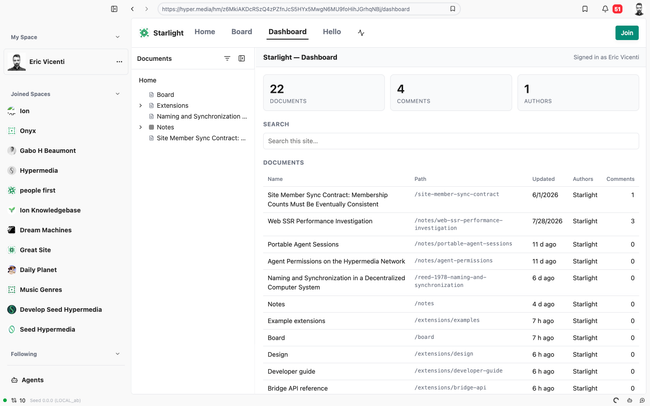
1. Dashboards and overviews of a site (site-dashboard). A publication wants a "newsroom" view: every document, who
edited it last, how many comments, what changed this week, a search box. Today that needs a fork of the web app; with an
extension it is one HTML file installed at /dashboard. Variants: an editorial calendar, a "stale documents" report, a
contributor leaderboard, a citations map.
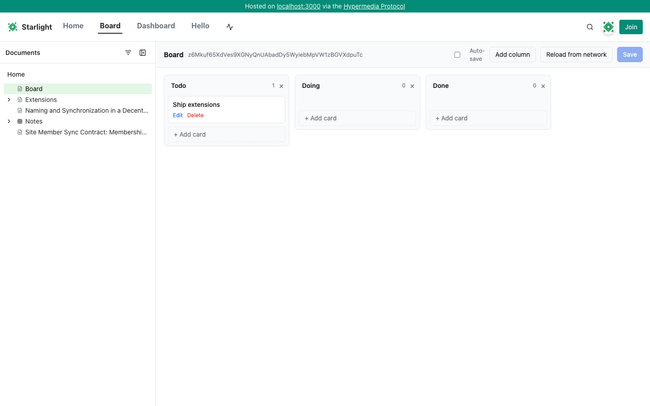
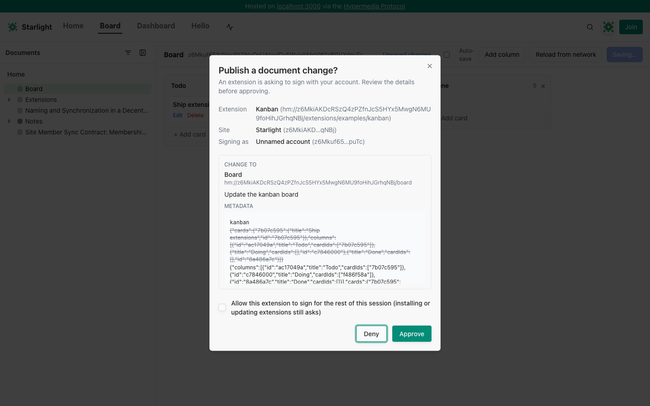
2. Apps whose state is a document (kanban). A team wants a kanban board over their documents: columns and cards
live in metadata.kanban of the document at /board; moving a card produces a signed document change by the person who
moved it, so history, authorship and sync come for free. Variants: a roadmap/timeline, a reading list with statuses, a
glossary editor, a decision log with structured fields, an issue tracker where each card links to a document.
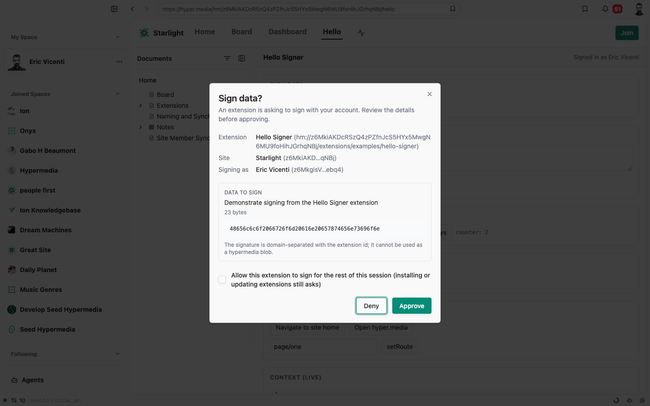
3. Interactive tools that sign as the viewer (hello-signer shows the primitives). A site wants readers to _do_
something, not just read: RSVP to an event, vote on a proposal, sign a petition or a statement of support, submit a form
that becomes a comment or a document, attest "I reviewed this version". Each action is a signature by the reader's own
account, confirmed in a dialog they can read, and stored as hypermedia data anyone can verify.
4. Custom ways to browse a site. A gallery of image documents; a map of documents with coordinates in their
metadata; a table view of a folder with sortable attributes; a "start here" onboarding page that walks a newcomer
through a curated path. These are read-only and need nothing but query and navigate.
5. Site-specific integrations, read from the viewer's side. A course site that shows each student their own progress
(comments they wrote, documents they completed); a community that shows "members who cited this"; a research group's
citation graph. The extension reads through the viewer's client, so it sees exactly what they may see.
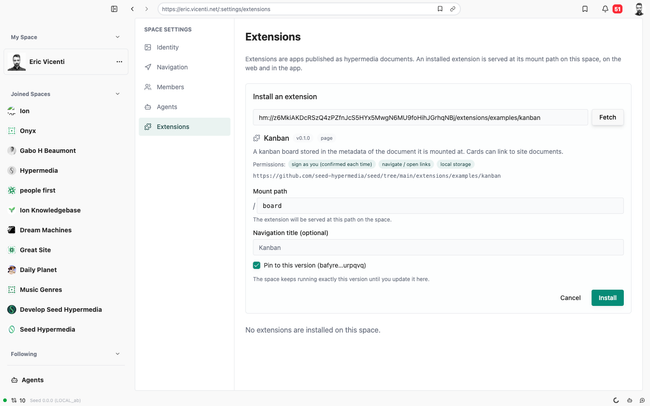
Common to all of them: the site owner installs the extension with one action, readers get it in the site's own
navigation on web and desktop, and the extension author never runs a server.
When not to use a page extension
You want a new kind of content inside documents (a chart block, an embedded form) → that is a custom block; not in
this PR, but the same manifest/install/bridge will host it.
You want to change how the site looks → theming metadata, not code.
You need background work, private state, or to act on behalf of a site (notifications, agents, indexing) → a
service or an agent tool; extensions run only while a viewer has the page open and only sign as that viewer.
You want to modify the editor → not an extension surface.
Why this type first
Highest expressed demand (dashboards, boards, forms), and it exercises the whole lifecycle — packaging, discovery,
install, permissions, sandboxing, signing UX, hot-reload — without touching the editor. Everything below the page kind
is kind-agnostic, so custom blocks are an increment rather than a second system. Rationale and alternatives are in
decisions.md; the sequence for the other kinds is in roadmap.md.
Do you like what you are reading? Subscribe to receive updates.
Unsubscribe anytime