

Written 2026-08-31 at the end of the first build. This is the "where things stand" page: what exists, how it was
verified, how to try it, what is deliberately not done, and everything an implementer picking the branch up needs that
is not derivable from the code. The normative spec is design.md; the decision history is
decisions.md; the verification log is testing.md.
Scope delivered
Full-page ("Custom Page") extensions for web and desktop, distributed as hypermedia documents, with a bridge that
lets an extension read hypermedia data and sign as the viewer without ever holding a key. Every layer below the page
kind is kind-agnostic so blocks / attribute editors / themes can reuse it (roadmap.md).
Layer | Location |
|---|---|
Schemas, resolution, protocol |
|
Host (shared by both apps) |
|
Web integration |
|
Desktop integration |
|
Extension SDK (iframe side) |
|
CLI |
|
Examples |
|
Tests | unit suites in client / ui / sdk / web / desktop / cli; CLI fixture suite; Playwright browser test |
Docs |
|
Where to try it
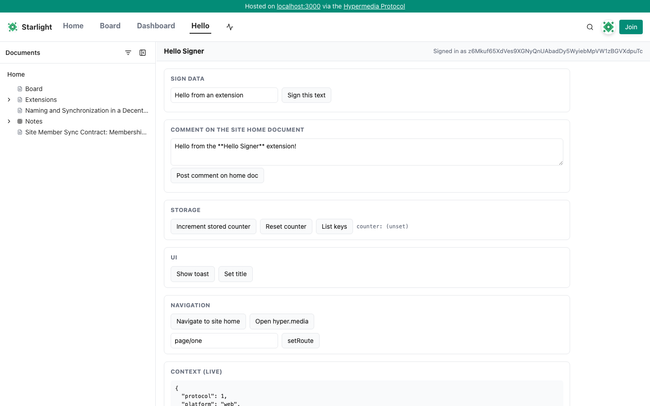
The three examples are published under the Starlight account (z6MkiAKDcRSzQ4zPZfnJcS5HYx5MwgN6MU9foHihJGrhqNBj) atextensions/examples/* and installed on that site, pinned:
Mount | Extension | What to expect |
|---|---|---|
| Hello Signer | Live context panel; buttons for |
| Site Dashboard | Document table with comment counts, stat tiles, search, recent activity. Read-only. |
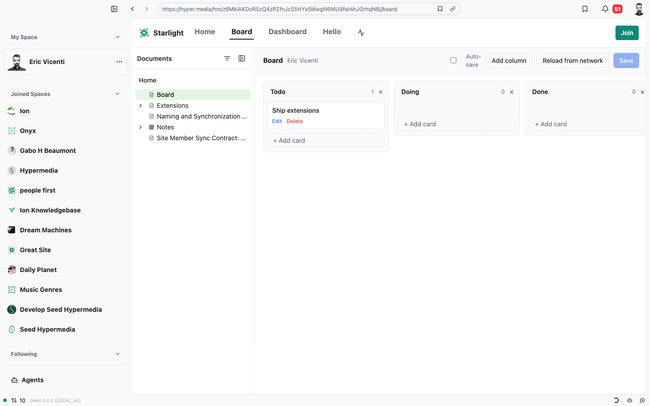
| Kanban | Board stored in |
Desktop (mainnet dev build from this branch): open hm://z6MkiAKDcRSzQ4zPZfnJcS5HYx5MwgN6MU9foHihJGrhqNBj/board; the
site header shows Board · Dashboard · Hello.
Web (local dev server from this branch, any registered site): gateway form
http://localhost:3000/hm/z6MkiAKDcRSzQ4zPZfnJcS5HYx5MwgN6MU9foHihJGrhqNBj/hello. On a deployed gateway the same path
works under https://hyper.media/hm/<uid>/hello once this branch ships.
Hot reload: pnpm --filter @seed-extensions/kanban dev then append ?extdev=http://localhost:5183 (loopback only) or
add the override in desktop Settings → Advanced → Extension dev overrides.
Space settings → Extensions on desktop: paste an hm:// extension URL, Fetch, review the manifest, pick the
mount, Install (pinned by default).
How it was verified
Unit: client 49, ui 112, extension-sdk 20, web 252, desktop 11 (extension helpers), cli 168 + 16; CLI fixture suite 11
against a real daemon; Playwright browser integration test 4/4 (publishes + installs hello-signer on a fixture site,
checks sandbox flags, handshake, storage, not_signed_in, gateway form, ?extdev= on/off).
Manual, headless Chromium against the local web dev server and mainnet Starlight: handshake, storage, toast,
sign.data and sign.comment through the native dialog (comment verified in the daemon), kanban sign.document as a
non-member (refused with the daemon's capability error) and as the owner (document created, card persisted across
reload), dashboard data, iframe survival across sub-path navigation.
Manual, desktop dev app driven over CDP: same flows with platform: desktop, signing through the daemon, Space
settings → Extensions install form (fetch + manifest preview).
Review: a 26-agent workflow (six lenses, each finding adversarially verified) produced 18 confirmed findings and 8 doc
inaccuracies; all were fixed and re-verified. The two high-severity ones — ?extdev= accepting arbitrary hosts, andnavigate('/\\evil.com') escaping the origin — are recorded in decisions.md and
security.md.
Environment notes for the next person
The local web dev server is registered to a different account than Starlight, so the gateway form
(/hm/<uid>/<mount>) is the primary local test path; site-native /<mount> works on the registered site.
The local daemon must have discovered the extension documents and the home document version that carries the install
records. If a page shows "Extension unavailable … not available on this node yet", POST /hm/api/discover for the
site home and the extension documents (or open them once in the desktop app).
Web dev under heavy file churn can wedge Vite's optimizer ("Invalid hook call" on hydration, or a cached config 500):
restart pnpm web and rm -rf frontend/apps/web/node_modules/.vite.
Driving the desktop dev app over CDP: kill every node_modules/electron/dist/Electron.app process first — a leftover
instance holds the single-instance lock and a new one hangs after will-finish-launching with no window. Launchpnpm dev:debug (not under a pty). Navigate by clicking the omnibar URL span, then typing into the visible input.
A throwaway CLI key named exttest was created on mainnet for signing tests; its test comments were deleted.
Pre-existing failures unrelated to this branch: client client.test.ts (Search mock), vault-local.test.ts (reads
the machine's real vault), ui comments.test.tsx (routes mock), desktop agents-live-titling (needs the agents
server).
Deliberately not done
Template (native-component) UI modality — the bridge is designed for it; no host implements it.
Extension kinds other than page (block, attribute, theme are reserved in the schema only).
CLI publishing/installing under a shared space account (the CLI signs as the key's own account; the desktop UI handles
shared spaces).
Network egress control for the iframe, resource limits, per-viewer settings, extension directory/discovery UI.
setRoute query parameters on desktop (the desktop document route has no query field).
Nav entries render in the site header on both platforms, not in the desktop sidebar.
Open questions
See the end of roadmap.md: per-document install capabilities, a manifest csp field for frame egress,
and a "verified publisher" signal in the install UI.
Do you like what you are reading? Subscribe to receive updates.
Unsubscribe anytime