


Problem
Seed stores document attributes. Writers need a way to use those values in the body of a document. They also need simple calculations that stay connected to their inputs. Because document attributes are part of the document, they must have a way to get referenced. This document propose one option to do this.
Solution
⚠️ WARNING ⚠️
All decisions are subject to change, so take this work and solution as a Prototype. We are welcome to feedback to make all decisions as robust and modular as possible.
Let writers insert references to document attributes and simple formulas directly into their text. The document stores the reference or expression. Seed resolves it and displays the value where the writer inserted it.
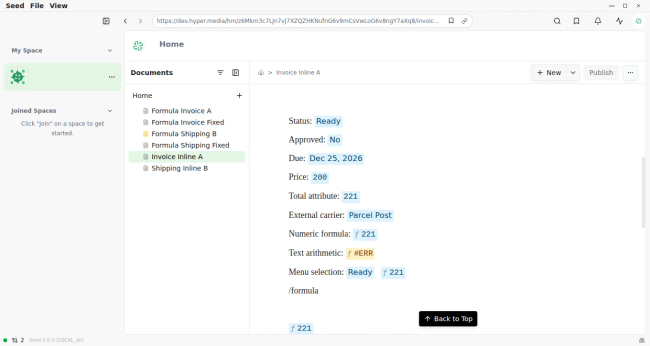
For example, a budget document can have price = 100, tax = 21, and a total attribute containing the formula =price + tax. A proposal can show that total without maintaining a second copy. The same approach works for nonnumeric values such as status, dates, and lists.
Writing and reading
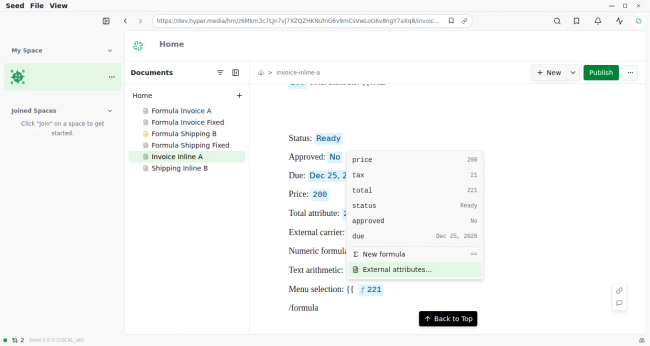
Type {{ to choose an attribute from the current document. Choose External attributes… to search for another document and select one of its attributes.
Type ==, or choose New formula from the attribute menu, to write a formula in place. Show attribute and function suggestions, plus a live result.
While writing a formula, select a document through autocomplete or click an existing attribute chip to insert a reference. Writers should not need to type document identifiers.
Show the resolved value in an inline chip. Click a chip to edit its reference or expression.
Show text, numbers, dates, booleans, and lists as readable values. Keep arithmetic numeric; displaying a list does not make it a formula range.
Show a loading state while a source is being fetched. Show an error for missing attributes, invalid expressions, circular references, or division by zero.
Keep the writer in document edit mode when they dismiss the attribute menu. Allow an empty formula to be cancelled with Escape.
The main user stories are: “reuse a fact without copying it,” “calculate a total from document attributes,” and “refer to a fixed version when a value must remain stable.”
Attribute references: URL format
Extend an existing document URL with one of two query parameters:
hm://<account-id>/<document-path>?attr=<encoded-attribute-key>
hm://<account-id>/<document-path>?formula=<encoded-expression>
The document part identifies the source. attr selects one metadata key. formula evaluates an expression with that document as its local context. The examples below use placeholder account and version identifiers.
Use | Example |
|---|---|
Read the |
|
Read a key that contains a space |
|
Calculate |
|
Read |
|
Calculate using a fixed document version |
|
Encode the key or expression as a query-parameter value. In particular, encode a literal + as %2B. Preserve an existing v parameter and append attr or formula with &. Generated links use one of these selectors, not both.
Within an expression, a bare key refers to the expression's source document. Use this syntax for a reference to another document:
price + [[hm://<other-account-id>/rates]].tax
price + [[hm://<other-account-id>/rates?v=<version-id>]].tax
The editor can display the document title, but the stored expression uses its hm:// URL. If the expression is stored in a formula query parameter, encode the whole expression, including the embedded URL.
An unversioned reference uses available current data. In the editor, local draft metadata takes precedence over published metadata. A versioned reference uses the specified published version and does not use a local draft. Pinning the formula's source document does not pin every external dependency: each external reference must specify its own version when a reproducible result is required.
Attribute keys are exact metadata keys. In formula syntax, keys start with a letter or underscore and can then contain letters, digits, underscores, or dots. A dotted key such as theme.size is one key, not a nested-property lookup. Direct attr links can address keys that the formula grammar cannot express, such as keys with spaces.
Technical decisions
Keep attributes in document metadata. Reuse the existing Attributes interface and document storage. A formula-valued attribute is a string that starts with =, such as =price + tax. An inline formula stores its expression in the reference URL without needing a separate attribute.
Reuse inline embeds. Store the URL through the existing Embed annotation and editor inline-embed node. The prototype needs no new block type or backend schema. The intended fallback in clients that do not interpret the selectors is a normal document mention; verify that behavior before release.
Use a small expression language. Support numbers, attribute references, parentheses, unary signs, +, -, *, /, and sum, avg, min, max, count, abs, and round. Parse expressions and evaluate them with a fixed function set. Do not execute JavaScript. These functions take explicit numeric arguments; count counts those arguments, not documents in a collection.
Separate display from calculation. Display nonnumeric attributes as text. Calculations accept numbers, numeric strings, and booleans as 1 or 0; formula-valued attributes are evaluated recursively. Other text and lists are not arithmetic inputs. Format results for the reader's locale, with up to six fractional digits in the prototype.
Resolve values in the client. Keep parsing and evaluation in the shared package, with editor code responsible for loading metadata and displaying results. Load referenced documents as needed through existing resource APIs. Store the expression, not a calculated snapshot.
Preserve references through first publication. When a draft receives its published path, retarget inline attribute and formula links whose source is that draft. Preserve links to other documents and fixed versions. This does not provide general rewriting of document URLs embedded inside formula expressions.
These decisions describe the current branch prototype. Release work must confirm publishing, reading, and compatibility across the supported clients.
Scope
Proposed remaining time: one to two working weeks for one engineer, with product review. This is a planning estimate, not a delivery commitment. The branch already contains the core implementation and automated tests.
Phase | Deliverable and dependency |
|---|---|
Confirm reference and value rules | Agree on version behavior, supported keys and types, and error messages. Use the existing prototype for review. |
Complete the writing and reading flow | Check local and external attributes, formula editing, keyboard behavior, and first publication in desktop and web. Depends on the agreed rules. |
Verify and prepare release | Check saved-document round trips, fixed versions, dependency errors, and fallback behavior in other clients. Complete browser and CI checks, and add user documentation. |
The first release includes attribute insertion, numeric formulas, references between documents, fixed-version resolution, and clear loading and error states. It uses the existing attribute-editing interface.
Release acceptance requires that an attribute change updates an unversioned reference when new metadata is available; a versioned reference remains fixed; saved references survive reopening and publication; and keyboard actions do not interrupt document editing.
Rabbit Holes
Spreadsheet features: ranges, cell addressing, large function libraries, and formulas over entire collections.
A general dependency engine with background recalculation, cached results, and dependency visualizations.
Automatic repair after attribute renames or document moves, especially URLs embedded inside expressions.
Rich text, date arithmetic, units, currencies, and a general type system for formulas.
Complex formatting controls for each chip or a separate formula-builder interface.
A redesigned attribute schema or a new protocol entity for each attribute.
No Gos
No arbitrary code execution, custom scripts, or user-defined executable functions.
No new backend service or stored calculated values for the first release.
No silent replacement of missing or invalid values with zero.
No overriding fixed-version references with current drafts or newer published values.
No promise that an unversioned reference is a permanent snapshot or that all readers see the same draft values.
No access to source documents outside the reader's existing access rights.
No requirement to type raw hm:// URLs for normal use.
No replacement of @ mentions, the existing Attributes interface, or a spreadsheet application.
References
Photo by Bozhin Karaivanov on Unsplash
Do you like what you are reading? Subscribe to receive updates.
Unsubscribe anytime