

At the end of every
Urgent Bugs. Please fix the Urgent Bugs as soon as possible. We need Main to be as stable as possible and available for release. Urgent Bugs are blockers for release.
Zero or One Active Project. No more than one. We need to focus on one problem at a time. Sequentially, we will conquer the world. Projects should outline Project Tasks, which have priority over Enhancement Notes and non-Urgent Bugs. Projects involve other team members, so we need everybody to move as quickly as possible to avoid blocking others.
At least five Bugs. Move the top 5 bugs from the backlog list to the Todo list. When Bugs accumulate, even if they are not urgent, they degrade the product's perceived quality and experience. We must fix bugs and refactor continuously every week.
At least two enhancement notes. Each Knowledge Worker should have at least two approved enhancement notes. In case an Enhancement Note still requires a decision, label it as such in Linear.
Knowledge Tasks. Include participating in a Design Project, writing or reviewing a Technical Project, writing an enhancement note, participating in their argumentation, or filing a bug. Everything else starts with a Knowledge Task. How much time we spend on Knowledge tasks depends on the team's available effort compared with the pipeline of work ready to implement.
We aim to complete this pool of tasks by next Tuesday. The engineer can decide the order based on what best fits their context, energy level, and execution flow.
The current product has dozens of known minor issues that cause significant user pain and have remained unresolved for months due to poor methodological execution. We receive constant user feedback — our North Star and our anchor to reality — and to improve user outcomes and satisfaction, we need an efficient process that channels collective thinking and structured argumentation into fast, reliable task execution. Enhancement Notes will serve as the decision-making funnel for system improvements, and the expectation is to handle them with the same speed as bugs.
Process
Hypertuesday: Surfacing User Pains
Each Hypertuesday, we review User Feedback as a team. User Feedback becomes part of our knowledge repository and exposes conflicts within it. A core task of the Seed System is to, as knowledge emerges, identify and resolve these contradictions and shape better solutions.
Labeling the User Pain
Every User Pain must be categorized as one of the following:
Bug: broken behavior.
Project: large initiative requiring discovery or multi-step planning.
Enhancement: small/medium improvement to an existing feature.
Distant-Future User Story: valuable but not actionable yet.
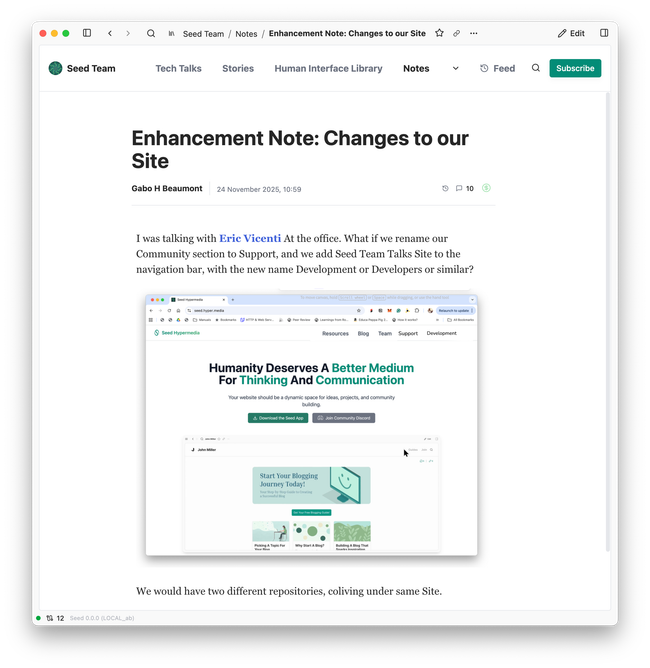
Writing the Enhancement Note.
If labeled as an Enhancement, a Team Member writes an Enhancement Note explaining:
The pain or problem.
The context.
Any relevant user comments or examples.
Argumentation & Review
The Enhancement Note is reviewed by relevant peers. Through argumentation structures, conflicts are resolved and clarity emerges.
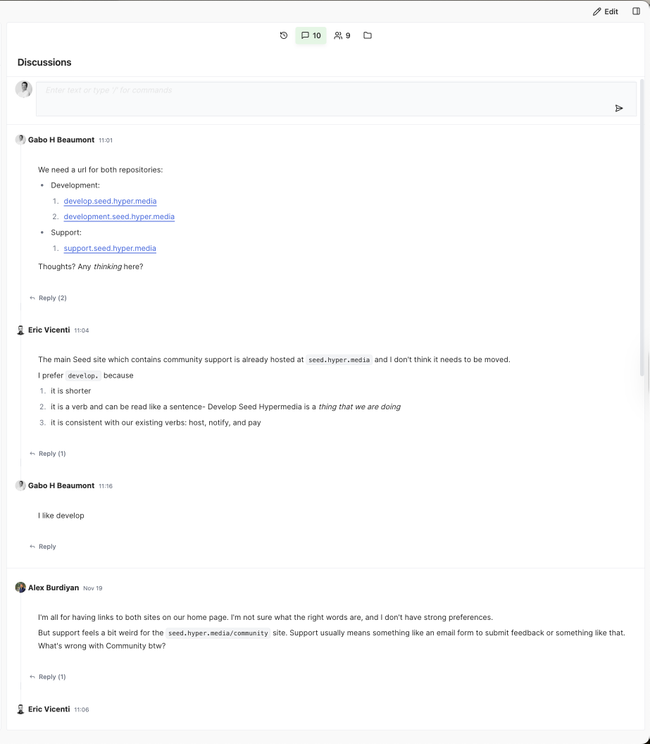
The Note is then updated with the agreed-upon solution.
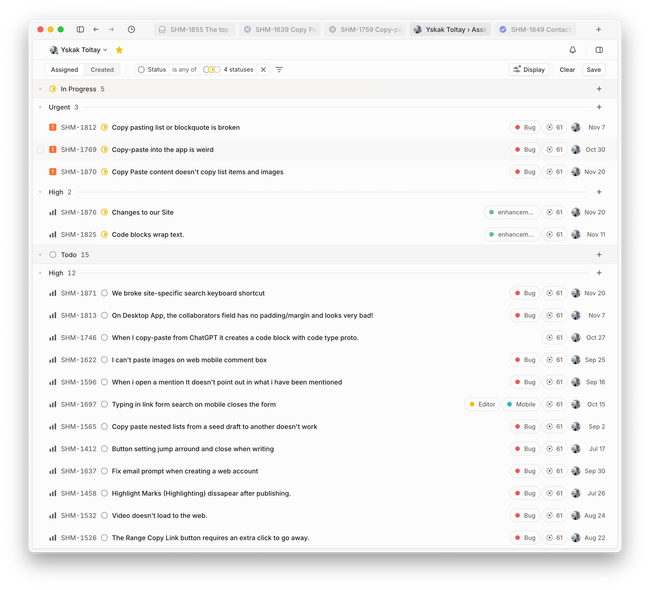
Creating a Linear Task
Once a solution is agreed-upon, a Linear Task is created and assigned to a responsible person. It is prioritized alongside:
Active Bugs.
Ongoing Projects.
Other Enhancements.
This forms the Linear list of Issues the team executes against.
Enhancement Notes Statuses
Inspired by
The authors of the first RFCs typewrote their work and circulated hard copies among the typewrote researchers. Unlike the modern RFCs, many of the early RFCs were actual Requests for Comments and were titled as such to avoid sounding too declarative and to encourage discussion. The RFC leaves questions open and is written in a less formal style. This less formal style is now typical of typewrote documents, the precursor step before being approved as an RFC.
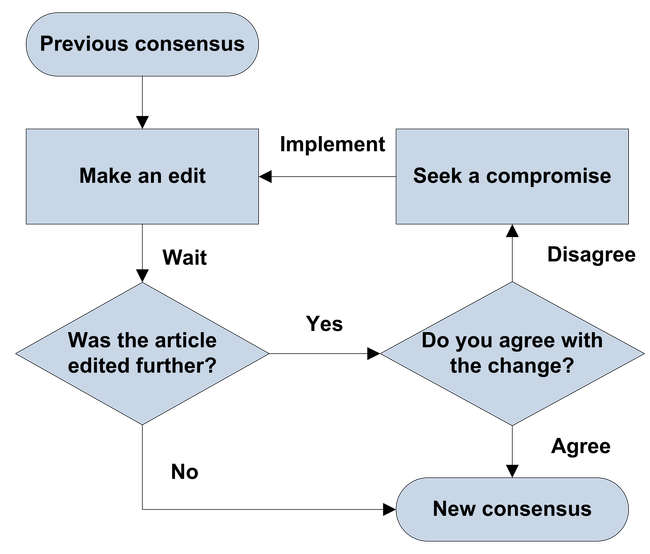
RFCs follow a lightweight, discussion-driven lifecycle:
Draft: The document is written but still evolving.
In Review: The proposal is open for comments, objections, and alternatives.
Accepted: Consensus is reached; the proposal is approved.
Implemented: The proposal has been executed and is now active.
Rejected: The proposal will not move forward (usually documented with reasons).
The key principles are: transparent stages, argumentation-first review, consensus-driven decisions, and implementation only after approval.
What is the difference between a Project and an Enhancement
A Project is a larger, higher-uncertainty initiative that requires discovery, design, or cross-team planning.
An Enhancement is a small, well-scoped improvement to an existing feature, where both the problem and solution are clear and can be executed quickly.
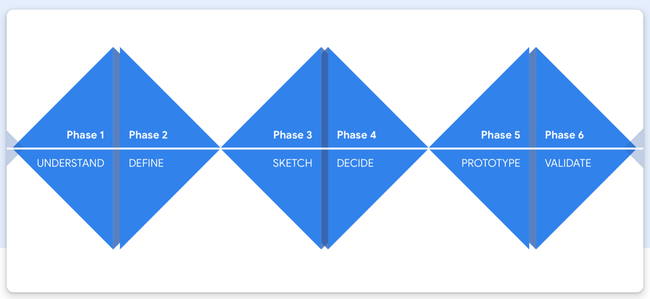
Phase 3: Sketch
Phase 4: Decide
Phase 5: Prototype
Phase 6: Validation
Other Material
Design the Solution
Collective Effort:
State a clear Outcome.
Short descriptions of the User Stories that each of us have in mind.
Inspirations from other apps that each of us have in mind.
Sketches with idea that each of us have in mind.
Both Ux and Technical Pros and Cons from everybody on the team.
Voting the Best Solution.
Hopefully there is consensus on the team. If not Gabo is the decision maker of last resource.
Designer Effort:
State Clear User Goals through the User Stories.
What information must the user learn to accomplish the goal.
What are the User Steps.
Final Pixel Perfect Designs.
This guide outlines our shared approach to organizing and prioritizing issues, enabling us to reduce friction, avoid overload, and stay focused on what matters most.
Issues Status
Backlog
Every new Issue goes to Backlog. Every week we should move around 7 to 10 issues from Backlog to Todo.
Todo
Todo Issues is our appetite for the week. We expect to finish all the Todo Issues by HyperTuesday Meeting.
In Progress
When we start working on an Issue we move it to In Progress.
In Review
If the definition of done is uncertain change status to In Review and re-assign the Issue to another coworker.
Done
GET THINGS DONE :).
Canceled
When the Issue is not relevant anymore change the status to Canceled.
Duplicate
When there is a Duplicate Issue change the status to Duplicate and add a link to the remaining Issue.
Triage
Every issue must have an owner. Anybody can add an owner. If it is uncertain ask Gabo.
Triage by Urgency and Impact
We use four levels of priority to triage issues:
Urgent
Critical blockers or regressions that must be addressed immediately.
→ Example: App crashes on launch, production login broken.
High
Important issues that significantly impact the user or team. Should be picked up in the current or next cycle.
→ Example: Friction in onboarding flow, major UI bugs, broken nav on mobile.
Medium
Valuable but not time-sensitive. Should be scheduled as part of roadmap planning.
→ Example: Adding a setting, performance optimization.
Low
Nice-to-haves, polish, or speculative ideas. Should be reviewed occasionally.
→ Example: Animating transitions, microcopy tweaks, internal tooling.
Categorize by Type
Every issue should be labeled by type to improve clarity, ownership, and focus. Main types:
Bug – Something is broken or not working as expected.
Enhancement – UX, performance, or design polish to existing parts coming from an Enhancement Note in Seed.
Feature – A new functionality to implement coming from a Project Task in Seed.
Technical Debt – Refactoring or cleanup that improves long-term maintainability.
Labels
Task Type:
Project Task.
Enhancement Task.
Bug.
Knowledge Task.
Design Task
Scope:
Desktop.
Editor.
Email.
Web.
Gateway.
Discussion.
Feed.
Blocked by:
Needs Decision.
Needs Repro.
Browser:
Chrome.
Safari.
Platfrom:
Mobile
Windows
The easiest way to describe, identify and implement Issues is by linking to the latest design. We will be creating a
Seed User Stories
Foreword by Martin Foller
One of the beneficial consequences of the rise of Agile software development is the notion of splitting up large sets of requirements into smaller chunks. These chunks—stories—enable much more visibility into the progress of a development project. When a product is built story-by-story, with each story’s implementation fully integrated into the software product, everyone can see the product grow. By using stories that make sense to users, developers can steer the project by determining which stories to build next. This greater visibility helps encourage greater participation from users—no longer do they have to wait a year or more to see what the development team’s been up to.
But this chunking has some negative consequences. One of these is that it’s easy to lose the big picture of what a software system should do. You can end up with a jumble of pieces that don’t fit into a coherent whole. Or you can end up building a system that isn’t really helpful to the users, because you’ve missed the essence of what’s needed by getting lost in the details.
Story mapping is a technique that provides the big picture that a pile of stories so often misses.
That’s it, really—the description of this book in a single sentence. And that sentence carries with it the promise of a lot of value. A big picture helps communicate effectively with users, it helps everyone involved avoid building unnecessary features, and it provides an orientation for a coherent user experience. When I talk to my colleagues at ThoughtWorks about what they do to develop their stories, story mapping regularly comes up as a core technique. Often they’ve learned that technique from workshops run by Jeff, because he’s the one who developed the technique and can best communicate it. This book allows more people to understand this technique directly from its source.
But this isn’t just a book for people who have something like “business analyst” on their business card or online profile. Perhaps the biggest dis
When Kent Beck (who originated the notion of a “story”) developed his ideas on software development, he called out communication as a key value of effective teams. Stories are the building blocks of communication between developers and those who use their work. Story maps organize and structure these building blocks, and thus enhance this communication process—which is the most critical part of software development itself.
Foreword by Alan Cooper
In Mary Shelley’s famous science-fiction novel, Frankenstein, the mad Doctor Frankenstein builds a creature from disparate pieces of dead humans and brings the creature to life with the then-new technology of electricity. Of course, we know that this is not actually possible. You cannot create life by sewing together random body parts.
Yet this is what software developers attempt to do all the time. They add good features to software, one at a time, and then wonder why few users love their product. The heart of the conundrum is that developers are using their construction method as a design tool, but the two are not interchangeable.
It’s entirely reasonable that programmers build software one feature at a time. That’s a perfectly good strategy, proven over the years. What has also been proven over the years is that, when used as a method for designing the behavior and scope of a digital product, one-feature-at-a-time yields a Frankenstein monster of a program.
While they are intimately related, the practice of designing software behavior and the practice of building that software are distinctly different, and are typically performed by different people with different skill sets. The many hours that interaction designers spend observing users and mapping behavior patterns would drive most programmers batty. Conversely, the hours of sweating over algorithms are too solitary for most designers.
But when the two strains of practice—design and development—collaborate, the work becomes electric and has the potential to create a living, breathing product. Teamwork breathes life into the monster and makes people love it.
While the idea of collaboration is neither new nor particularly insightful, it is actually very difficult to do effectively. The way that developers work—their pace, language, and rhythm—is quite different from that of interaction designers.
Practitioners in each of the two fields are strong, capable, and internally well disciplined, yet they share a single, common weakness. It is really hard to express a design problem in programming terms, and it is equally hard to express a development problem in design terms. The two sister disciplines lack a common tongue. And that junction between the two disciplines is precisely where Jeff Patton lives.
Jeff’s method of story mapping makes sense to developers, and it makes equal sense to designers. Story mapping is the Rosetta Stone for our digital age.
Despite protestations to the contrary, Agile development is not a very useful design tool. It is a way of thinking about development that is design-friendly, which is a very good thing, but by itself it won’t get you to a product that users love. On the other hand, so many times we have seen good designs, well documented, given to developers—Agile or not—who manage to kill the essence of the design in the process of implementation.
Patton’s story mapping approach is the bridge over this chasm. Interaction design is all about finding the user’s truth and telling it as a narrative. Software development is all about breaking those narratives into tiny, functional chunks and implementing and integrating them. It’s so ridiculously easy for the essence of the narrative to slip away during this complex process. Yes, the functions are implemented, but the patient dies on the operating room table.
By mapping out the user’s stories, the design retains its narrative structure yet can still be deconstructed for effective implementation. The designer’s story, which is a formalized version of the user’s story, remains intact throughout the development.
The conventional corporate world has proven that it is nearly impossible for a team of two or three hundred people to build a product that people love. Meanwhile the startup community has proven that a team of four or five people can build small products that people love, but even these little products eventually grow big and lose their spark. The challenge we face is creating big software that people love. Big software serves large audiences doing complex, commercially viable jobs. It’s ridiculously hard to make such software fun to use and easy to learn.
The only way we are going to build big software that is not a Frankenstein monster is by learning how to integrate the disciplines of software design and development. Nobody knows how to do that better than Jeff Patton.
Introduction
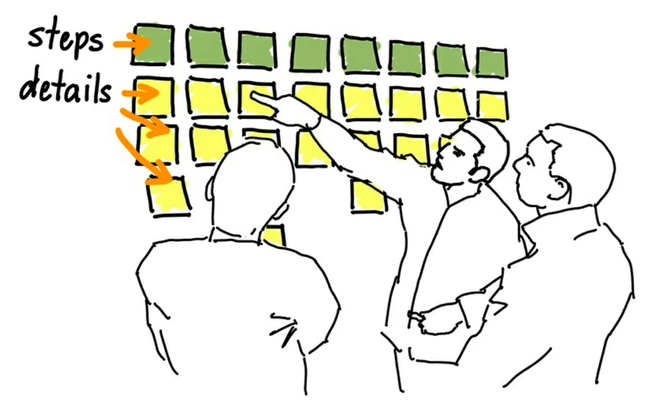
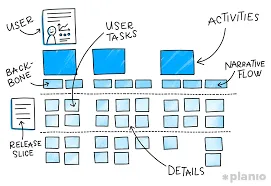
Building a map is dead simple. Working together with others, I’ll tell the story of a product, writing each big step the users take in the story on sticky notes in a left-to-right flow. Then, we’ll go back and talk about the details of each step, and write those details down on sticky notes and place them vertically under each step. The result is a simple grid-like structure that tells a story from left to right, and breaks it into details from top to bottom. It’s fun and fast. And those details make a better backlog of stories for our Agile development projects.
Building Shared Understanding
If we get together and talk you can te
User Stories
Writing small titles in cards (stories) and discussing upon them was a great way of prioritizing, taking into account that one card could take hours or even days of development. User Story Mapping Book
Stories aren't a written form of requirements; telling stories through collaboration with words and pictures is a mechanism that builds shared understanding.
Stories aren't the requirements; they're discussions about solving problems for our organization, our customers, and our users that lead to agreements on what to build.
Your job isn't to build more software faster: it's to maximize the outcome and impact you get from what you choose to build.
Minimize output, and maximize outcome and impact.
How to define Outcome
But, while it’s necessary, the output isn’t the real point; it’s not the output that we really wanted. It’s what comes after as a result of that. It’s called outcome. Outcome is what happens when things come out—that’s why it’s called that—and it’s difficult because we don’t get to measure outcome until things do come out. And we don’t measure outcome by the number of features delivered, or what people have the capability to now do. We measure what people actually do differently to reach their goals as a consequence of what you’ve built, and most important, whether you’ve made their lives better.[2] That’s it. You’ve changed the world.
Patton, Jeff. User Story Mapping: Discover the Whole Story, Build the Right Product . O'Reilly Media. Kindle Edition.
The Big Picture.
Telling Stories, Not Writing Stories.
Stories get their name from how they should be used, not what should we written.
Plan to Build Less.
Plan to Learn Faster.
Plan to Finish on Time.
You Already Know How
The Real Story About Stories
Telling Better Stories.
It's Not All on the Card.
The Card is Just the Beginning.
Bake Stories Like Cake
Rock Breaking.
Rock Breakers.
Start with Opportunities.
Using Discovery to Build Shared Understanding
Using Discovery for Validated Learning
Refine, Define and Build
Stories Are Actually Asteroids
Learn from Everything you Build
Frame the problem. Who is it for, and why are we building it?
Map the big picture. Focus on breadth, not depth. Go a mile wide and an inch deep (or a kilometer wide and a centimeter deep, for my friends in the rest of the world). If you don’t have a clear solution in mind, or even if you think you do, try mapping the world as it is today, including pains and joys your users have.
Explore. Go deep and talk about other types of users and people, how else they might do things, and the kinds of things that can (and likely will) go wrong. For extra credit, sketch, prototype, test, and refine solution ideas—changing and refining the map as you go.
Slice out a release strategy. Remember: there’s always too much to build. Focus on what you’re trying to achieve for your business, and on the people your product will serve. Slice away what’s not needed to reveal minimum solutions that both delight people and help your organization reach its goals.
Slice out a learning strategy. You may have identified what you think is a minimum viable solution, but remember that it’s a hypothesis until you prove otherwise. Use the map and discussion to help you find your biggest risks. Slice the map into even smaller minimum viable product experiments that you can place in front of a subset of your users to learn what’s really valuable to them.
Slice out a development strategy. If you’ve sliced away everything you don’t need to deliver, you’ll be left with what you do need. Now slice your minimum viable solution into the parts you’d like to build earlier and later. Focus on building things early that help you learn to spot technical issues and development risks sooner.
Future Product
The current state of the User Story Map is not what we are going to build. It is how we imagine Today the Product from the Future. However, having a clear path of the Future Product allows us to define better the software we are building today. Also, as we build today we keep on changing the future dynamically. The Future Product is in constant change: features are removed and added, their priority is changed and they get defined in detail. As we learn from Today we defined the User Stories of the future, hammering down the product. Once a User Story is well enough defined, and has gone through weeks surviving as a to be develop feature that will benefit our users, we will start developing it.
1. Opportunities
Gabo adds hm://z6MkuBbsB1HbSNXLvJCRCrPhimY6g7tzhr4qvcYKPuSZzhno/opportunities to the list, stating a clear Outcome. The order of the opportunities list defines the prioritization. Focus on opportunities in the top 10.
2. Research
From the Opportunities list, Gabo creates a hm://z6MkuBbsB1HbSNXLvJCRCrPhimY6g7tzhr4qvcYKPuSZzhno/projects. In the project, we maintain a proper argumentation process to surface disputes and solutions through comments and notes. Projects include small enhancements.
Gabo is responsible for ensuring that a project has an outcome, stories, and problems.
@Untitled Contact adds designs and workflows to the hm://z6MkuBbsB1HbSNXLvJCRCrPhimY6g7tzhr4qvcYKPuSZzhno/human-interface-library section; they should include short descriptions of the User Stories.
Everybody should share their inspirations with notes and their ideas with sketches.
Developer in charge adds the software architecture definition, No Gos, and the Rabbit Holes section.
We greenlight projects at Hypertuesdays.
3. Plan and Code
The assignee developer creates a Plan with Claude from the project document or codes the project himself.
The PR is generated, and a Reviewer reviews and merges it.
4. Test
QA the functionality and file the corresponding bugs.
@Untitled Contact reviews the implementation, giving feedback on the project before completing it.
Talk to users and check the Outcome contrasting the User Task and the Solution. If new feedback is received on a completed project, the process must be restarted.
References:
Inspired by Design Process and User Story Mapping
Do you like what you are reading? Subscribe to receive updates.
Unsubscribe anytime