

As an user I want to check all document versions history so that I can review versions and restore in case I need
Acceptance criteria
The user can click in the contextual button and go to versions history any time
The user can see when was the last version published before publishing
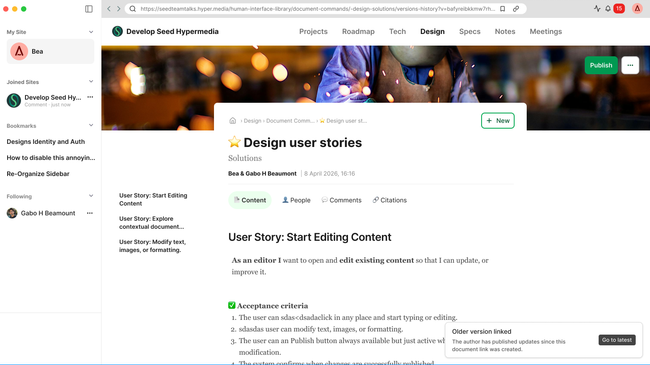
The user sees a notification when visiting a link pointing to an older version, with the option to navigate to the latest version. The notification dismisses automatically after 10 seconds.
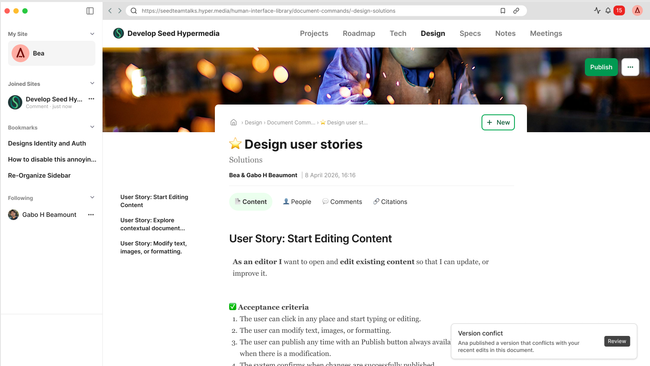
The user is notified when another editor publishes a version that conflicts with their current edits, with the option to review the conflict. The notification persists until the user acts on it.
The user can restore a previous version as the current one. A dialog will pop up with this text:
Title: Restore this version?
Paragraph: Your current draft will be discarded. This version will become the new latest version — you can always restore back later if needed.
Buttons: Cancel (secondary style) / Restore (Primary style — red danger)
The user can select any two versions to compare them, with differences highlighted (TBD)
The user can review conflict versions and review the two versions conflicting -> Choose one of the two (take the one I want) // or do a mix by taking one and editing the selected version .
Do you like what you are reading? Subscribe to receive updates.
Unsubscribe anytime