

Agents can call tools from remote Model Context Protocol (MCP) servers. An account connects servers the same way it configures model providers, and each agent enables the servers it may use. The model-facing surface does not change. The verbs are still the whole surface, and every remote tool arrives as a tool document in the agent's ~/tools/. So it is listed in the Space index, read as a contract, dispatched through call, and promoted like any builtin or lambda (see tools).
Why Seed has no MCP server of its own
Seed Agents is an MCP client. It connects to MCP servers that other people run. Seed has no MCP server that exposes Hypermedia to outside assistants.
Hypermedia content must be signed on the device that holds the key, and the SDK or the CLI built on it does that signing. A hosted MCP server takes plain tool calls and acts on them remotely, so it would need your private key. Keys should never leave your device. The full reasoning, and how to run an MCP interface locally on the SDK, is in Why there is no Seed MCP server.
An agents server does sign content, and that fits the same rule. The keys it signs with are the agent's own. CreateSigningIdentity generates a new key on that server, publishes a profile for it, and stores the key encrypted. Your account key stays on your device. For the agent to publish in your space, you delegate a WRITER or AGENT capability to the agent's key.
Agent keys are less secure than your personal identity by design, because the agents server holds them. That is one reason to give an agent its own key instead of your personal one. ImportSigningIdentity, the Import key button in the accounts dialog, sends the seed of an existing .hmkey.json key to the server, so only import a key made for the agent. If you don't want a hosted server to hold your agent keys, self-host the agents server.
Scope and transports
Only remote HTTP MCP servers work. The hosted, multi-tenant Agents service never spawns local stdio subprocesses. It accepts two transports:
http: Streamable HTTP (the current MCP transport);
sse: legacy HTTP+SSE.
When transport is unset, the service tries Streamable HTTP first and falls back to SSE if the connect fails, following the MCP backwards-compatibility guidance. It reports the first error.
Authentication uses static request headers, usually Authorization: Bearer …, stored as encrypted account secrets. There is no interactive OAuth flow. You cannot connect an MCP server that needs a browser login unless you can paste a token you already have in as a header.
Code: agents/src/mcp.ts (connect, discover, proxy, the per-run connection pool), agents/src/tool-documents.ts (syncMcpToolDocuments, the projection), agents/src/api-service.ts (actions and runtime wiring). The client is @modelcontextprotocol/sdk.
The model
account ──< mcp_servers (name, config, discovered tools, status)
agent.definition.mcpServers = ['github', 'linear']         ← the grant
agent's tool_documents ⊇ {kind: 'mcp', name: 'github__create_issue', server: 'github', remoteName: 'create_issue', …}
Server record (mcp_servers, see persistence): config_cbor is {url, transport?, headers?, secretRefs?}. tools_cbor is the tool list from the last successful discovery. status_cbor is {state: 'ok' | 'error' | 'unknown', error?, checkedAt?}.
Grant: definition.mcpServers names the servers an agent may call, at most 16 (see grants). Server names are slugs (^[a-z0-9][a-z0-9_-]{0,31}$) because they prefix every projected tool name.
Projection: every tool of every enabled server is an mcp tool document named <server>__<tool>. The remote name is sanitized to [A-Za-z0-9_-], and the whole name is capped at 64 characters, which is what providers accept as a tool name. The document carries the remote description and input schema, plus server and remoteName. Its CID is its version, so when a server changes a contract the document gets a new CID. syncMcpToolDocuments() brings one agent's mcp documents in line with its grant. It runs right away on CreateAgent/UpdateAgent, on every discovery, and on DeleteMcpServer. As a best-effort refresh it also runs on ListAgentTools, at run start, and before a user's palette verb. It is idempotent and touches only the database. If an authored lambda already holds a name, the lambda keeps it and the conflict is logged.
The remote input schema is kept whole, minus $schema and $id. The bounded local validator ignores keywords it does not model. So call still validates what it can, touch-expand answers a miss with the real contract, and a promoted tool hands the provider the full schema. Only a root that is not an object falls back to {type: 'object'}.
Discovery
The service connects to a server to list its tools at these times:
on SetMcpServer. The response carries the result, so a client shows "connected, N tools" or the exact failure at once. A failed discovery still saves the record, because the owner may be fixing a header or the server may be down;
on RefreshMcpServer;
quietly, whenever a run opens a connection to the server (see below). A server that added tools yesterday is current the next time any agent calls it.
A failed discovery records the error and keeps the last good tool list. An outage must not strip tools from agents that will call them once the server is back. A changed tool list is projected again onto every agent that enables the server, and emits agent-tools-changed, so an open Tools tab updates live.
Runtime
Connections are lazy and per run. Nothing opens at run start. The first call of a server's tool connects (McpConnectionPool, where concurrent calls share the handshake), and the run's teardown closes whatever it opened. The pool exists in all three places a verb runs: the agent turn (#runPiAgent), a script child's ctx.call, and a user's wrench palette verb (InvokeSessionTool). No place that can make a call lacks it.
executeMcpTool (api-service.ts) is the executor that call dispatches to for an enabled mcp document:
Validate the input against the document. A miss returns the contract, exactly like a builtin.
Check the grant itself (definition.mcpServers includes the document's server). The projection is a cache of the grant. It is not the grant.
Proxy the call over the pool with a 120s timeout.
A server-reported error (isError) and any transport failure are thrown. They land on the log as tool_result.error, which the model can react to.
The result is {summary, argument?, text?, result?, images?, durationMs}. argument is the call's first string argument, if it is short enough (≤ 80 chars) to name what happened. summary is <tool> · <argument>, or "Ran <tool> on the <server> MCP server" without an argument. text is the joined text content, bounded at 256 KiB. result is the server's structuredContent. Image content goes to vision models as inline parts, and the durable event keeps only the count. The chat row shows summary on a call row, and just argument on a promoted row, whose label already names the server and tool. A description on the call wins over both.
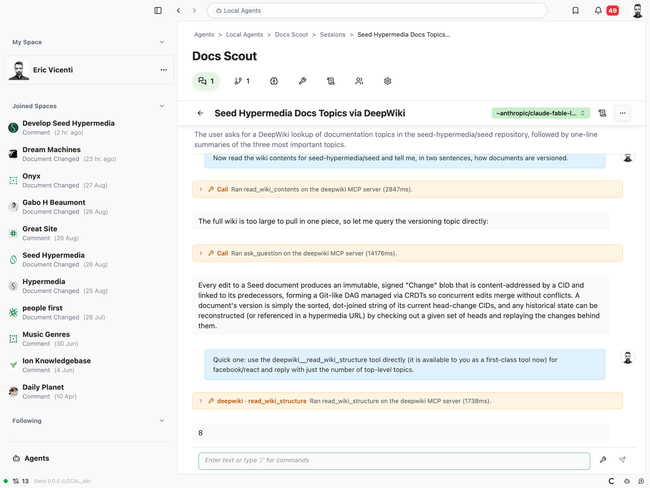
Promotion covers remote tools. Once read ~/tools/github__create_issue or a call of it has entered the transcript, the next turn hands the provider that document's name, description, and schema as a provider tool (toolMetadataFromDocument). The promotion filter admits the enabled callable set plus the agent's own enabled non-builtin documents, derived again from the definition at run start. A hallucinated name that matches nothing does nothing.
Space index: remote tools list as - github__create_issue — Open an issue. (github MCP). A server with more than six tools collapses to one line, - github__* — 23 tools from the github MCP server (read ~/tools/ to list them), so a large server does not overflow the index budget. read ~/tools/ always lists every tool.
read ~/self reports grants.mcpServers.
Signed actions
These are account-scoped and use the standard envelope (signed API):
ListMcpServers returns {servers: RedactedMcpServer[]}
SetMcpServer {name, config} returns {server}. It creates or updates by name, then discovers.
RefreshMcpServer {name} returns {server}. It discovers again.
DeleteMcpServer {name} returns {name}. It deletes the record and the header secrets it owns (mcp-<name>-…), removes the name from every agent's mcpServers, and drops their projected documents.
RedactedMcpServer is {id, name, url, transport, headerNames, secretHeaderNames, hasSecrets, tools, status, createdAt, updatedAt}. Each tools entry is {name, toolName, description?, inputSchema?}, where toolName is the document name. Secret values never appear in any response.
Desktop and web UI
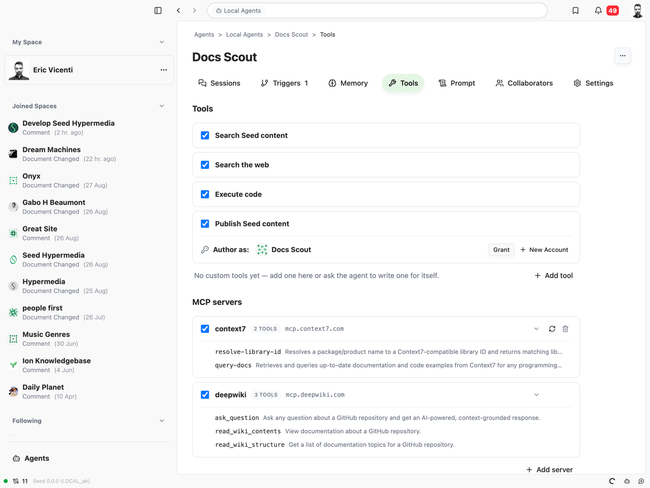
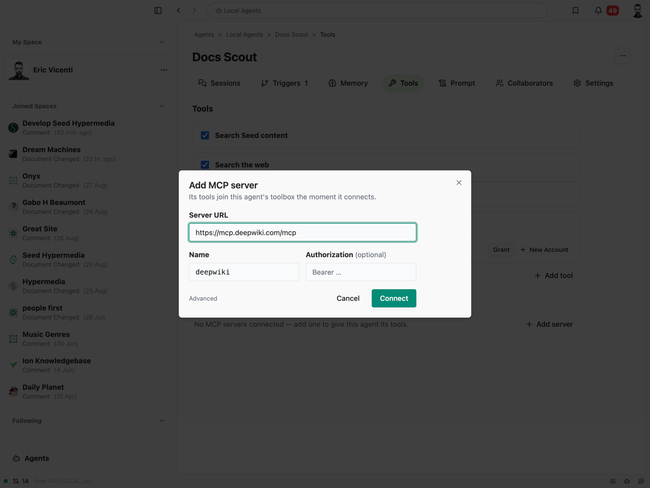
The Tools tab ends with an MCP servers section (see desktop UI). Each account server has one row with a per-agent checkbox, the tool count (or an Unreachable chip with the error underneath), an Auth chip when a secret header is set, the host, and refresh and remove buttons that show on hover. Clicking the row expands its tools, and a tool opens its contract. Add server takes a URL (the name is suggested from the host), an optional auth header, and the transport under Advanced. The dialog reports the connect result and enables the server for the current agent.
Screenshots
The Tools tab with two connected servers, one expanded:
Adding a server. The name is suggested from the URL, and the record connects on save:
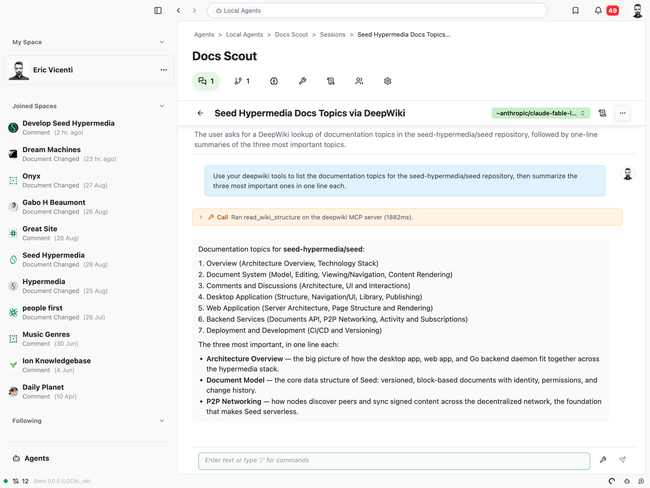
A session calling a remote tool through call, and a later turn using the promoted tool directly:
Security notes
The service reaches a server with URLs and headers the account configured. The same outbound-network rules as read https://… apply. There is no private-network allow or deny list yet (security).
Header values are encrypted at rest and redacted everywhere. The client refuses to send one to a remote agents server that is not on HTTPS.
An enabled server's tools can do whatever the remote server can do. Enabling a server is a grant as strong as execute, so the owner should trust the server.
The projection is never the authority. executeMcpTool checks the grant again, and promotion is filtered against the agent's own enabled documents.
Tests
agents/src/mcp.test.ts: naming, headers, result flattening, a real Streamable HTTP round trip (auth header included), discovery, and the pool (one handshake per server, shared by concurrent calls, closed together). agents/src/mcp-test-server.ts is the throwaway server the tests start.
agents/src/tool-documents.test.ts: the projection: sync, CID bump on a contract change, removal when disabled, lambda-name conflicts, refusal to delete or replace a remote tool.
agents/src/verbs.test.ts: call dispatch to a remote tool, touch-expand on a miss, thrown server and transport errors, the grant check, image content, index and listing tags, and the per-server collapse.
agents/src/api-service.test.ts: the actions end to end against a live test server. It covers discovery on save, invalid names, URLs, and headers, a saved but unreachable server, projection onto agents through CreateAgent/UpdateAgent, and delete scrubbing agents and secrets. It also runs a full session: the user calls a remote tool from the palette, the agent calls it through call, and the tool is promoted on the next turn.
Do you like what you are reading? Subscribe to receive updates.
Unsubscribe anytime