



US-3.1 —As a returning user, I want to sign in to my existing Hypermedia identity from the browser avatar icon so and join the site.
Acceptance Criteria
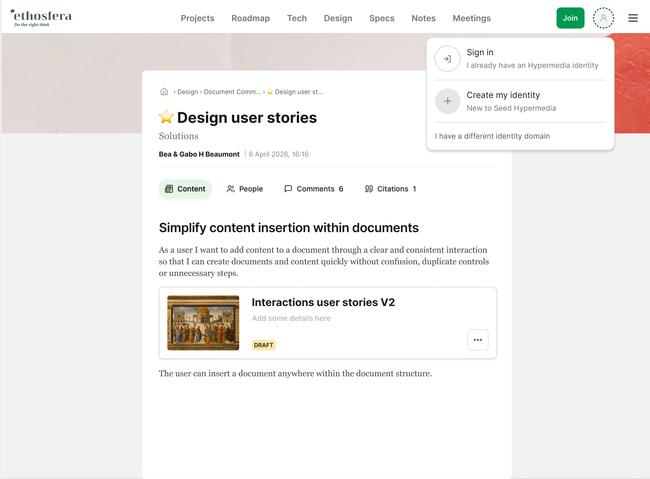
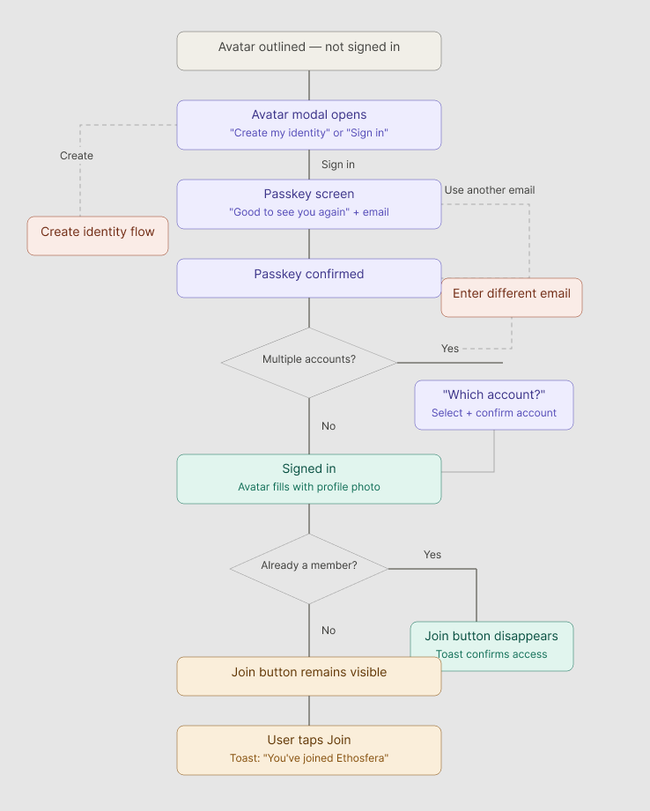
Avatar icon is outlined when the user is not signed in
Tapping the avatar opens a modal with three options: "Create my identity" and "Sign in — I already have an identity" or I have an identity from another site
Tapping "Sign in — I already have an identity" leads to the passkey screen
Passkey screen shows "Good to see you again", the email, and a "Sign in with passkey" button
"Use another email" option is available on the passkey screen
After passkey confirmation, if the user has more than one account, a "Connect your account" screen appears
The "Connect your account" screen lists all available accounts with one pre-selected.
User can change the selected account and tap "Confirm account" to proceed
If the user has only one account, this screen is skipped
Avatar updates to show the user's profile photo after sign-in
If already a member, Join button disappears and a toast confirms access
If not yet a member, Join button remains until tapped
Basic Flow
Tap avatar → account option appears
Sign in → Screen confirmation appears with "Good to see you again"
Confirm passkey → signed in, account options appears if user has more than one
Already a member → Join button disappears, toast appears
Not a member → Join button stays, user taps it to enrol
Edge Cases
User taps "Use another email" → email input appears → enters new email → returns to passkey screen
User enters an email not linked to any identity → Create new account flow prompt
User cancels or fails passkey → error shown, option to retry
Account list is empty → only "Create my identity" option is shown
User is already signed in → avatar shows photo, no sign-in flow triggered but list options (account settings, profile....)
Network error during sign-in → error message shown with option to retry
US-3.3.—As a returning user I want to create a new account in the browser by tapping the avatar
Do you like what you are reading? Subscribe to receive updates.
Unsubscribe anytime